How to Add AI to Your Existing Software: 2026 Guide
Add AI to the software you already run, without a rewrite. Use cases, integration patterns, a security checklist, costs and a 90-day rollout plan.
- Written by
- Uman
- Published
- Reading time
- 9 min read
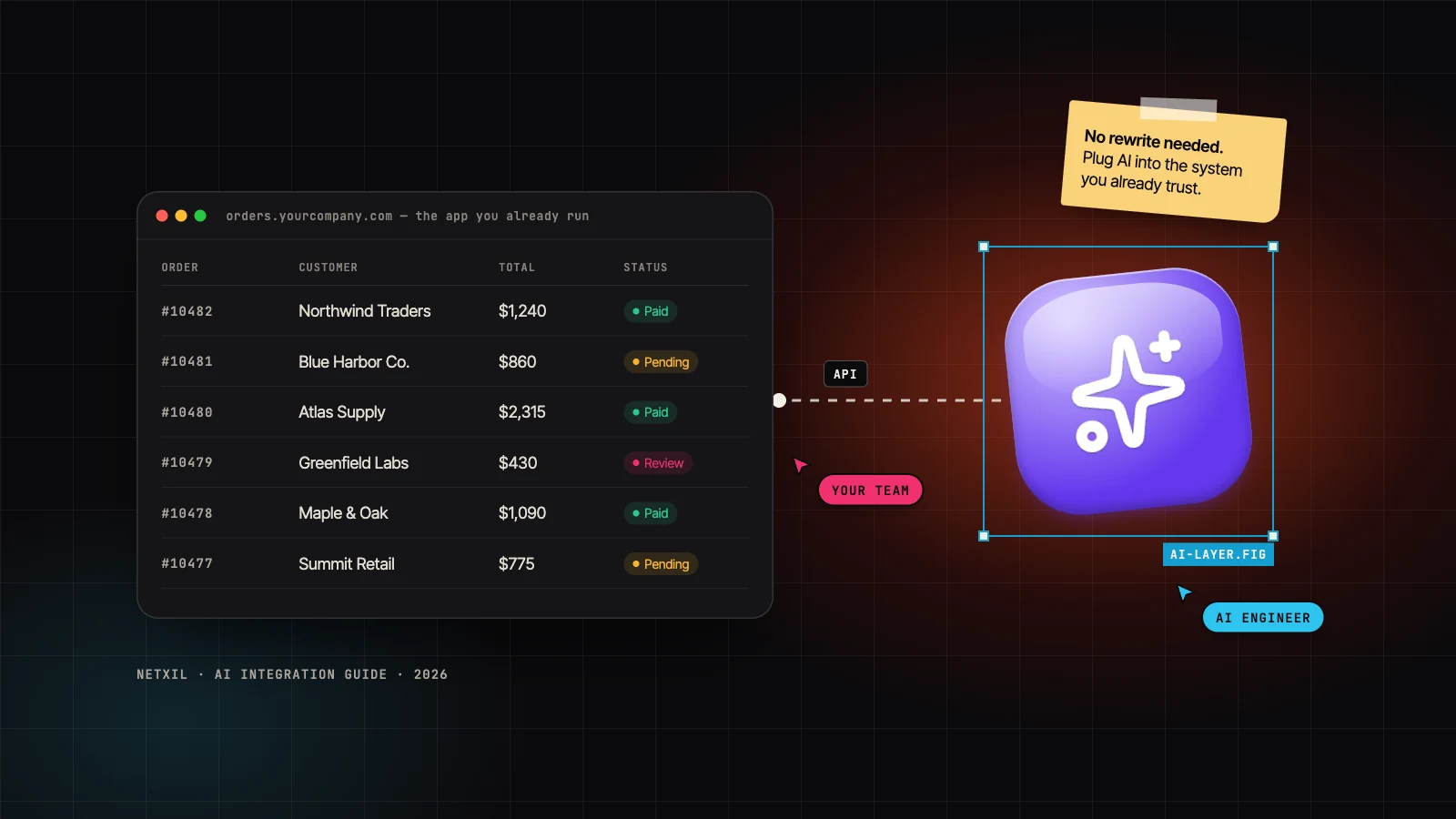
You don't need to rebuild your product to get real value from AI. The fastest wins come from connecting a language model to the data and workflows you already have: the CRM, the ERP, the support inbox, even the PHP app that has quietly run operations for a decade.
This guide shows how to add AI to existing software without a rewrite: where it pays off first, how to wire it in safely, what drives the cost, and a 90-day plan you can actually follow.
Key takeaways#
- Add an AI layer, don't rewrite. Your app calls a small AI service through an API, and the core system barely changes.
- Start with one workflow that has clear, measurable pain: search, documents, support or reporting.
- Ground answers in your own data with retrieval (RAG), and keep a person in the loop for anything that changes data or talks to customers.
- Test it like code. Keep a set of real examples and run every prompt or model change against it.
- Think weeks, not quarters. A focused pilot on one workflow is usually a few weeks of work.
Why you don't need a rewrite#
Rewrites are slow, expensive and risky. You spend months rebuilding business rules that already work before anyone sees a single new feature. AI features need three much smaller things:
- Access to the right data: the documents, records and events you already store.
- A place for the AI logic to run: a small service that builds prompts, calls a model and checks what comes back.
- A way to show the result: a button, a side panel, an email or an automatic update inside the tools your team already uses.
All three can sit next to your existing system and talk to it through APIs. That is what we mean by an AI layer: new capability bolted onto a system you already trust, not a replacement for it.
7 practical ways to add AI to existing software#
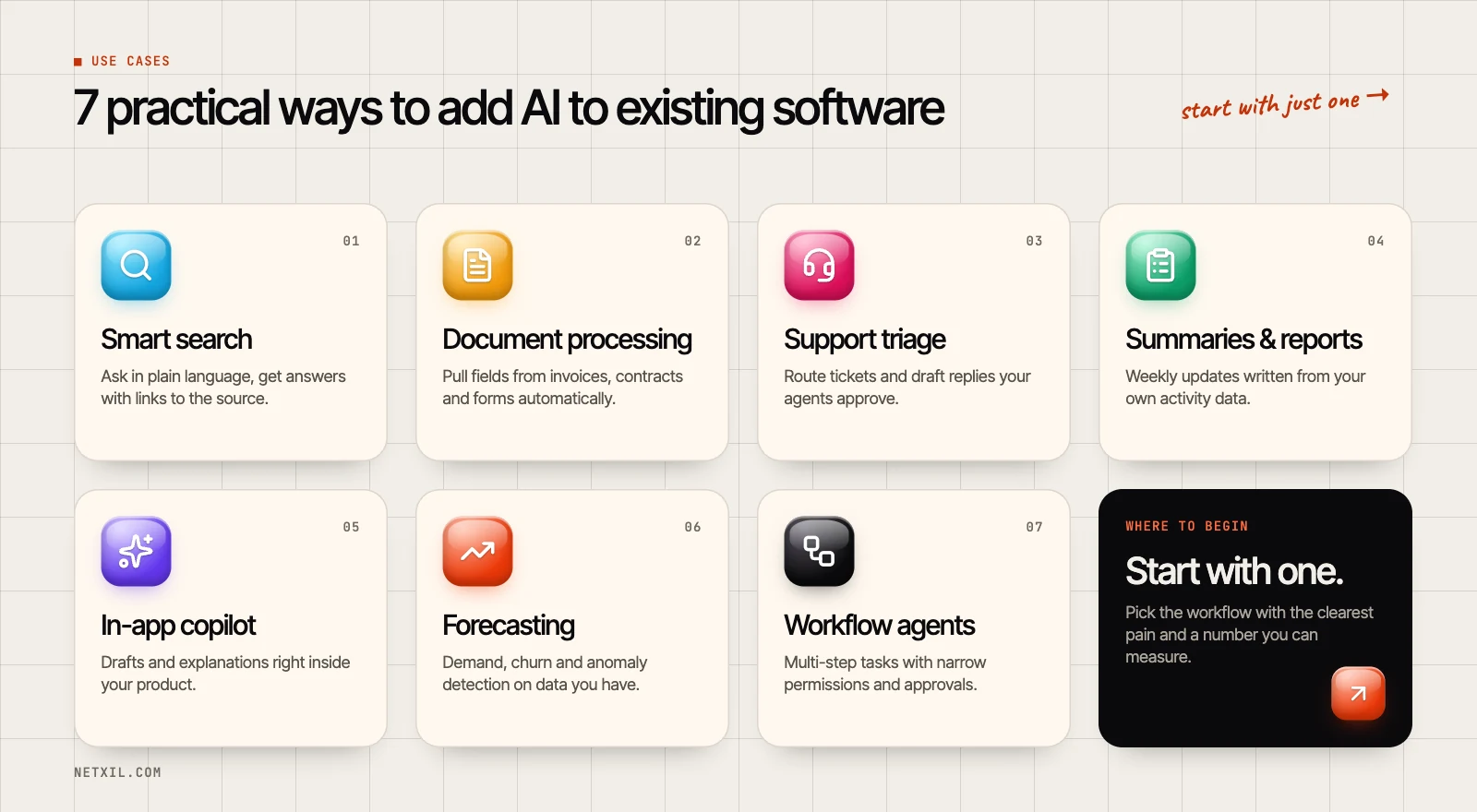 Seven practical ways to add AI to existing software, from smart search to workflow agents
1. Smart search over your own data#
Your team asks questions in plain language ("what's our refund policy for enterprise plans?") and gets an answer with links to the source documents. This uses retrieval-augmented generation (RAG), so the model answers from your content instead of guessing.
2. Document processing#
Invoices, contracts, purchase orders and onboarding forms: AI reads them, pulls out the fields your system needs and flags anything unusual for a person to check. It pairs naturally with an ERP or accounting system you already run.
3. Support triage and reply drafts#
Incoming tickets are classified, routed to the right team and given a draft reply based on your help centre. Agents stay in control: they edit and approve before anything is sent.
4. Summaries and reports#
Turn CRM notes, activity logs or call transcripts into a weekly summary for managers. It is low risk and quick to ship, which makes it a great first project.
5. An in-app copilot#
Add "help me write this" or "explain this screen" inside your product. Users get drafts, suggestions and plain-English explanations exactly where they already work.
6. Forecasting and anomaly detection#
Classic machine learning still earns its keep: demand forecasts, churn risk, and spotting errors or fraud in data you already collect. Not everything needs a large language model.
7. Workflow agents with guardrails#
For multi-step jobs, such as "read this email, check stock, create a draft order", an agent can call your existing APIs. Give it narrow permissions and require approval before anything is committed.
How the AI layer works#
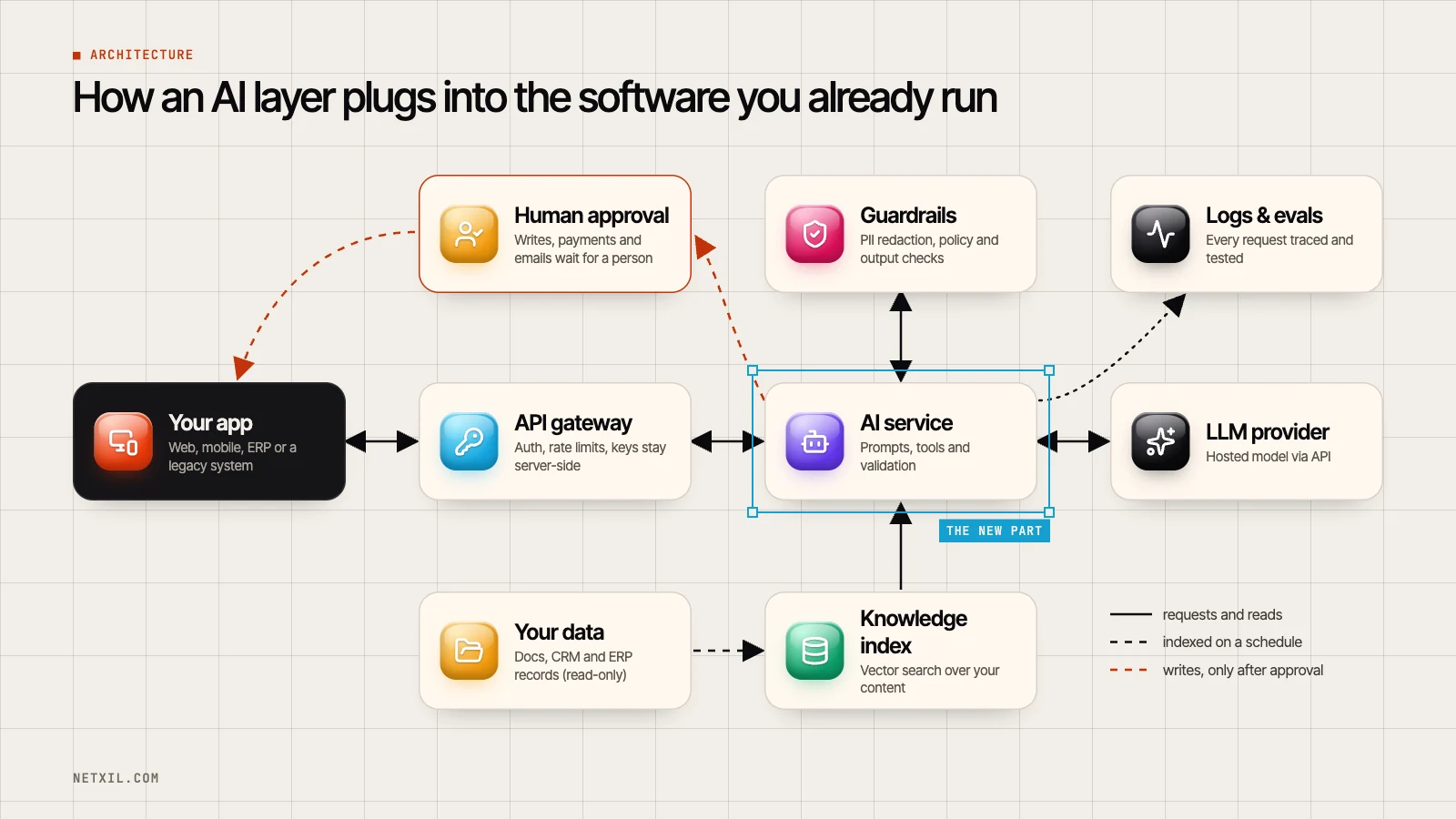 Architecture diagram: an AI service connects your existing app to a language model, a knowledge index, guardrails, logs and human approval
The pattern above works for web apps, mobile apps, ERPs and legacy systems alike:
- Your app calls a new internal endpoint instead of talking to an AI model directly.
- An API gateway handles authentication and rate limits, and keeps your model API keys on the server where they belong.
- The AI service is a small service you own. It builds the prompt, fetches context, calls the model and validates the output before anything else happens.
- A knowledge index holds your documents and records in a searchable form (usually vector search), refreshed on a schedule. The model reads from it; it never writes.
- Guardrails remove personal data from prompts, block unsafe requests and check that outputs match the format and rules you expect.
- Logs and evaluations make every request traceable, and a test set of real examples catches quality drops before your users do.
- Human approval sits in front of anything that changes data, spends money or contacts a customer.
The most important rule: the model never writes straight to your production database. It proposes; your code or a person decides.
Choosing an integration pattern#
| Pattern | Best for | Effort | Risk |
|---|---|---|---|
| API sidecar service | Adding AI features to any app, including legacy stacks | Low to medium | Low |
| Retrieval (RAG) | Answers grounded in your documents and data | Medium | Low to medium |
| Event-driven automation | Background jobs: documents, tickets, reports | Medium | Medium |
| In-app copilot | Drafting and explanations inside your product | Medium | Medium |
| Autonomous agents | Multi-step work across several tools | High | High without guardrails |
Most teams start with a sidecar service plus retrieval, then add automation once the first use case is proven.
Adding AI to legacy systems (PHP, Java, C and friends)#
Older systems can take part in AI projects without major surgery:
- Expose only what the AI needs through a thin API, or give it read-only access to a database replica.
- Keep the AI service separate from the legacy codebase so each can be deployed and scaled on its own.
- Process heavy work in the background with queues or scheduled jobs, so the legacy app stays fast.
- Write back through existing business logic, never around it, so every validation rule still applies.
This is the same approach we use in legacy system modernisation projects: add a clean interface around the old system first, then build new capabilities on top of it. For companies running a custom ERP, the same layer can serve every department at once (see enterprise applications).
A 90-day plan from idea to production#
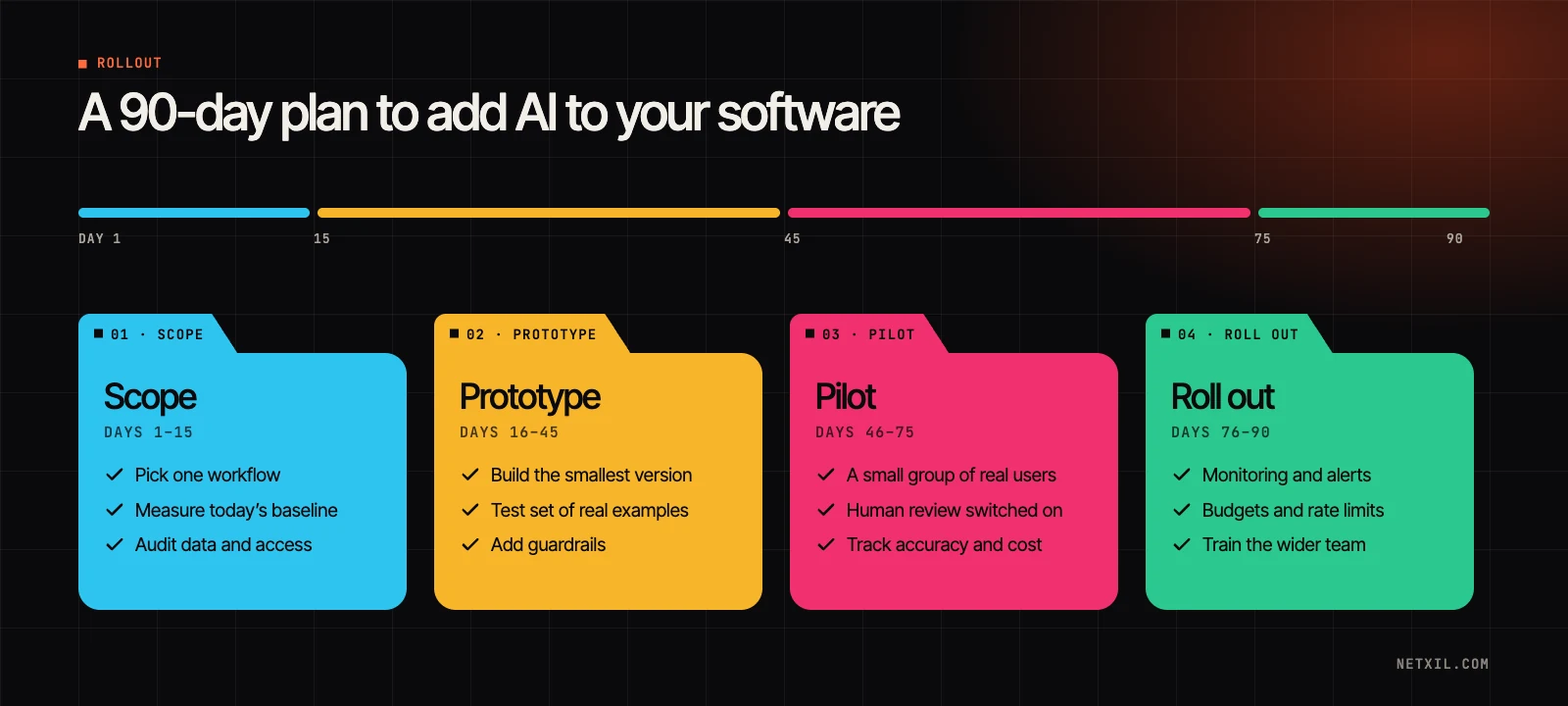 A 90-day plan for adding AI to existing software: scope, prototype, pilot and roll out
- Days 1–15: scope. Pick one workflow. Measure today's baseline (time per task, error rate, volume) and agree what "good" looks like. Check which data the AI may access and who owns it.
- Days 16–45: prototype. Build the smallest version that works end to end. Collect 50 to 100 real examples and turn them into a test set that every prompt or model change must pass.
- Days 46–75: pilot. Roll out to a small group with human review switched on. Track accuracy, adoption and cost per task, then fix the failure cases you find.
- Days 76–90: roll out. Add monitoring, alerts, budgets and rate limits. Write a short runbook, train the wider team and expand gradually.
The plan is deliberately boring. Boring is what gets AI features into production and keeps them there.
Security, privacy and compliance checklist#
Use this before any AI feature touches real customer data:
- Send the model only the data it needs, and mask personal and payment details
- Keep API keys on the server and rotate them regularly
- Confirm your provider's data retention and model-training settings in writing
- Defend against prompt injection (see the OWASP Top 10 for LLM Applications)
- Validate every model output before your system acts on it
- Require human approval for payments, deletions and customer-facing messages
- Log requests and responses, without sensitive data, for audits
- Map the remaining risks with a framework such as the NIST AI Risk Management Framework
What does it cost to add AI to existing software?#
Every project is different, but the cost always comes from the same four places:
- Building it: engineering time for the AI service, the integrations and the user interface. A pilot scoped to one workflow costs far less than a platform-wide rollout.
- Running it: most model providers charge by usage (per token, roughly the amount of text going in and out), so costs grow with volume and prompt size.
- Preparing data: cleaning documents, sorting out permissions and building the knowledge index.
- Keeping it healthy: monitoring, evaluation runs and the occasional update when models change.
Five ways to keep running costs under control:
- Cache answers to questions that come up again and again.
- Use smaller, cheaper models for simple steps such as classification.
- Keep prompts short and send only the context that matters.
- Batch background jobs instead of processing items one by one.
- Set per-user limits and budget alerts from day one.
How to measure ROI#
Decide how you will measure success before you build anything:
| Metric | What it tells you |
|---|---|
| Time saved per task | The direct productivity gain |
| Automation or deflection rate | How much work gets done without a person |
| Accuracy on your test set | Whether quality holds as prompts and models change |
| Adoption | Whether people actually use it |
| Cost per task | Whether the unit economics work at scale |
If a metric doesn't move during the pilot, that is useful too: it tells you to change the use case before you spend more.
Common mistakes to avoid#
- Starting with a vague "AI strategy" instead of one painful, measurable workflow.
- Letting the model answer from memory instead of grounding it in your own data.
- Shipping without a test set, so nobody notices when quality quietly drops.
- Giving agents broad write access "to save time".
- Forgetting the people who will use it. Adoption is a design problem, not just an engineering one.
Frequently asked questions#
Can I add AI to a legacy system without rewriting it?#
Yes. Expose the parts the AI needs through a small API, or give it read-only access to a database replica, and run the AI logic in a separate service. The legacy code barely changes, and every write still goes through your existing business rules.
Do I need to train my own AI model?#
Rarely. Most business use cases work well with an existing model plus your own data supplied through retrieval. Custom training or fine-tuning makes sense for very specialised language, strict latency needs or very high volumes.
Will my data be used to train the AI provider's models?#
Business and API plans from the major providers generally don't use your data for training by default, but terms differ between providers and plans. Confirm the data retention and training settings in your agreement before sending real customer data.
How long does it take to add an AI feature to existing software?#
A focused pilot on one workflow often takes a few weeks. Rolling it out across teams, with integrations, monitoring and training, takes longer and depends mostly on how easy your systems are to connect to.
What is RAG (retrieval-augmented generation)?#
RAG is a technique where the system first searches your own documents for relevant passages, then asks the model to answer using only that context. It reduces made-up answers and lets you show users exactly where each answer came from.
Is it safe to let AI agents take actions in our systems?#
It can be, with the right limits. Give agents the narrowest permissions possible, require approval for anything irreversible, log every action and start in a read-only mode until the results earn your trust.
Ready to add AI without the rewrite?#
NetXil helps teams add AI to the products and systems they already run, from the first pilot to a production rollout. Explore our AI development services, book a free 30-minute call or tell us about your project, and we will suggest the smallest useful first step.
Written by the NetXil team. We design and build AI features, SaaS platforms and enterprise systems for companies around the world.
- ai integration
- llm
- rag
- ai agents
- legacy modernization
- enterprise software
Working on something similar?
We build this kind of thing for a living. Let's talk.